





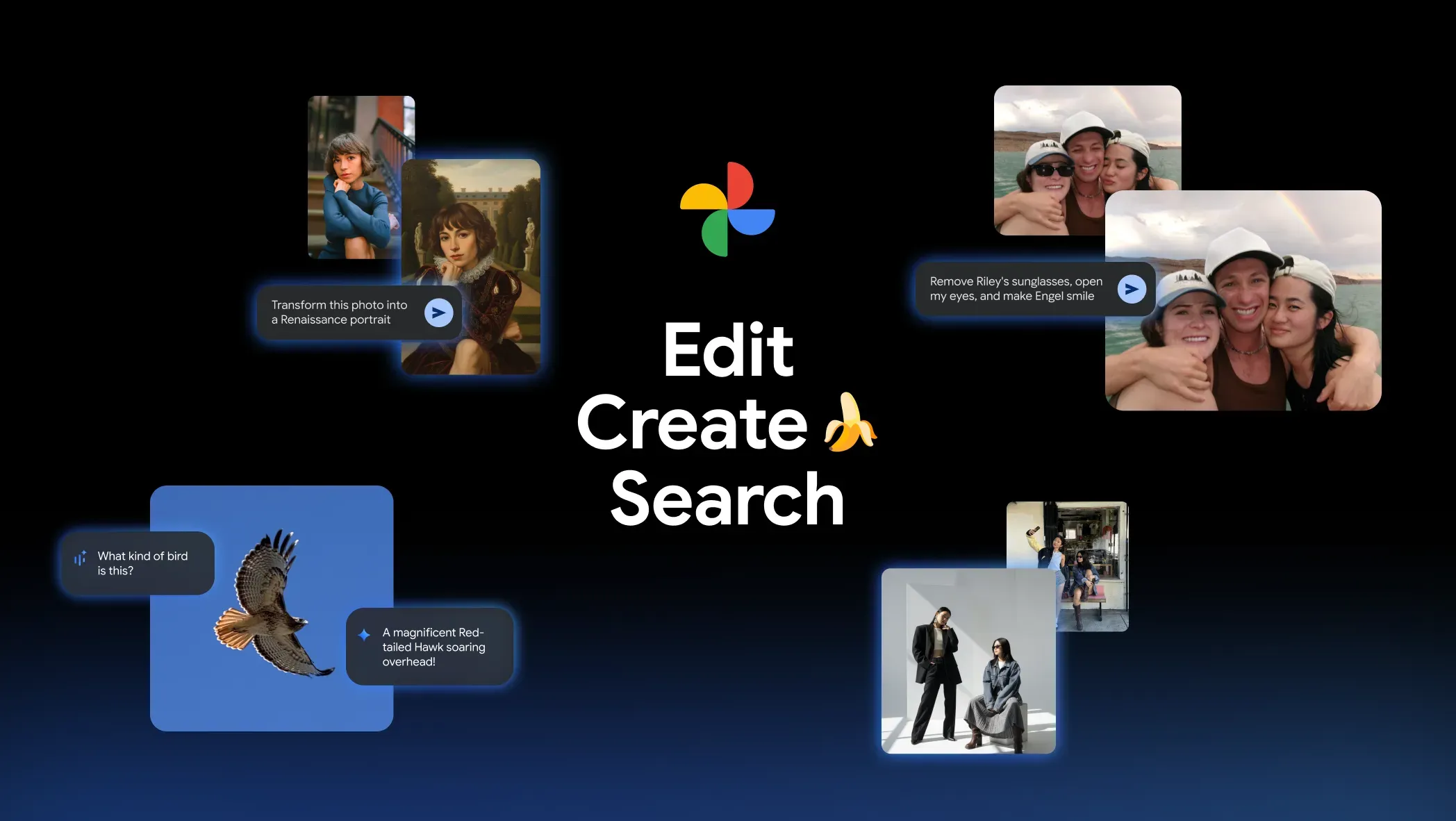
Code found in Google Photos v7.81 points to an unreleased feature called Moods, an AI-powered styling tool that could restyle a photo with a single tap. Android Authority reported the references in an APK teardown of Google Photos v7.81, and the technical details suggest Moods would work differently from standard filters and many existing editing tools.
A traditional filter applies the same contrast boost, color shift, or grain level to every image regardless of what is in the shot. Moods appears to take a different approach: the teardown points to cloud-based AI processing that may analyze the photo and apply changes suited to its content. If that is how the feature ships, each Mood would behave less like a fixed preset and more like an AI interpretation.
Keep the caveat up front: Moods is not functional yet, no one has tested its output, and APK teardowns can surface work that never reaches users. This is what the code suggests, not what Google has confirmed.
What Google Photos Moods appears to do
The current build points to Mood templates in Google Photos' Create tab, including Rich Textures, Pink Digicam, and Night Lights. Rich Textures appears aimed at adding depth and detail for a more tactile look. Pink Digicam seems designed to recreate the feel of early-2000s digital cameras. Night Lights appears focused on giving evening shots a softer, more cinematic style.
The Create tab already houses tools such as Remix, Highlight Video, Collage, and Cinematic Photo. Putting Moods there would position it as a creative styling tool, not a correction utility beside exposure sliders.
The technically interesting part is the per-image adaptation. Rather than applying uniform adjustments, Moods may analyze each photo and apply the selected style based on the image itself. Applied to a portrait, Rich Textures could theoretically behave differently than it would on a landscape shot. Whether that holds across different subjects, lighting conditions, and photo types cannot be determined until someone can actually run it.
The practical use case is simple: a user could chase a specific era, mood, or cinematic look without learning which sliders create it. The tradeoff is speed and simplicity versus control. A flat filter is predictable; AI interpretation is not.
Why Moods is different from standard filters
The simplest way to understand Moods is as a possible bridge between filters and generative editing.
A filter usually applies a fixed recipe. The same preset might warm up the colors, crush the shadows, add grain, or boost contrast no matter what is in the frame. That makes filters fast and predictable, but it also makes them blunt.
Moods appears to be more adaptive. If the cloud-processing clues in the teardown reflect the final product, Google Photos would not just drop the same visual layer onto every image. It would interpret the photo first, then decide how to apply the chosen style.
That could make Moods more useful for people who want a specific look without micromanaging every edit. It could also make the results harder to predict. If you tap Night Lights, the AI's idea of a glowing nighttime scene may not match yours.
How Google Photos got here
Moods fits Google Photos' recent shift from manual edits to AI-assisted editing.
Google broadened that shift in May 2024, when Magic Editor became available to more Google Photos users. Android Central's current guide to Google Photos AI editing tools notes that Magic Editor features have since been split into more specific tools, including Magic Eraser, Move, Reimagine, Auto Frame, Photo Unblur, Zoom Enhance, and AI Enhance. The point was simple: Google was moving advanced edits closer to one-tap actions.
Google introduced conversational editing with the Pixel 10 series in 2025, then began rolling it out to eligible Android users in the U.S. in September 2025. Instead of choosing tools and adjusting sliders, users could describe the change they wanted by voice or text. A single prompt could handle multiple edits at once, such as cleaning up glare and improving dull colors.
In November 2025, Google added Nano Banana-powered editing and ready-made AI templates to Google Photos, including a Create with AI section in the Create tab. That update pushed Photos further toward prompt-based and template-based creation.
Google Photos has been moving from manual sliders to AI-assisted tools, text prompts, and templates. Moods, if it ships, would remove the prompt. Users would choose a named style, and the AI would decide how to apply it to the specific photo.
What is still unknown
Google has not confirmed a launch timeline, device requirements, region list, subscription terms, or public test. Moods could appear first on Pixel phones, roll out broadly to Android, arrive on iOS later, or never ship at all.
Access could matter. Google has staged AI features by device, region, age, language, and account settings before. Conversational editing, for example, started on Pixel 10 devices before expanding to more eligible Android users in the U.S. Nothing in the teardown confirms whether Moods would follow a similar path.
The cloud-processing angle also raises questions the code cannot answer. If Moods generates AI-adapted styles server-side, users will need to know what data leaves the device, how the edit is handled, and whether the finished image gets any provenance label. Google has added provenance signals to some AI-edited images, but nothing confirms how Moods-edited images would be labeled.
An official launch is still unconfirmed. The teardown evidence is real; a public product is not confirmed.
If Moods ships as described, the pitch is simple: choose a style name and let Google Photos handle the look. The tradeoff is predictability. Until the feature works publicly, there is no way to know whether the AI's version of "Night Lights" or "Pink Digicam" will match what users expect.















Comments
Be the first, drop a comment!