



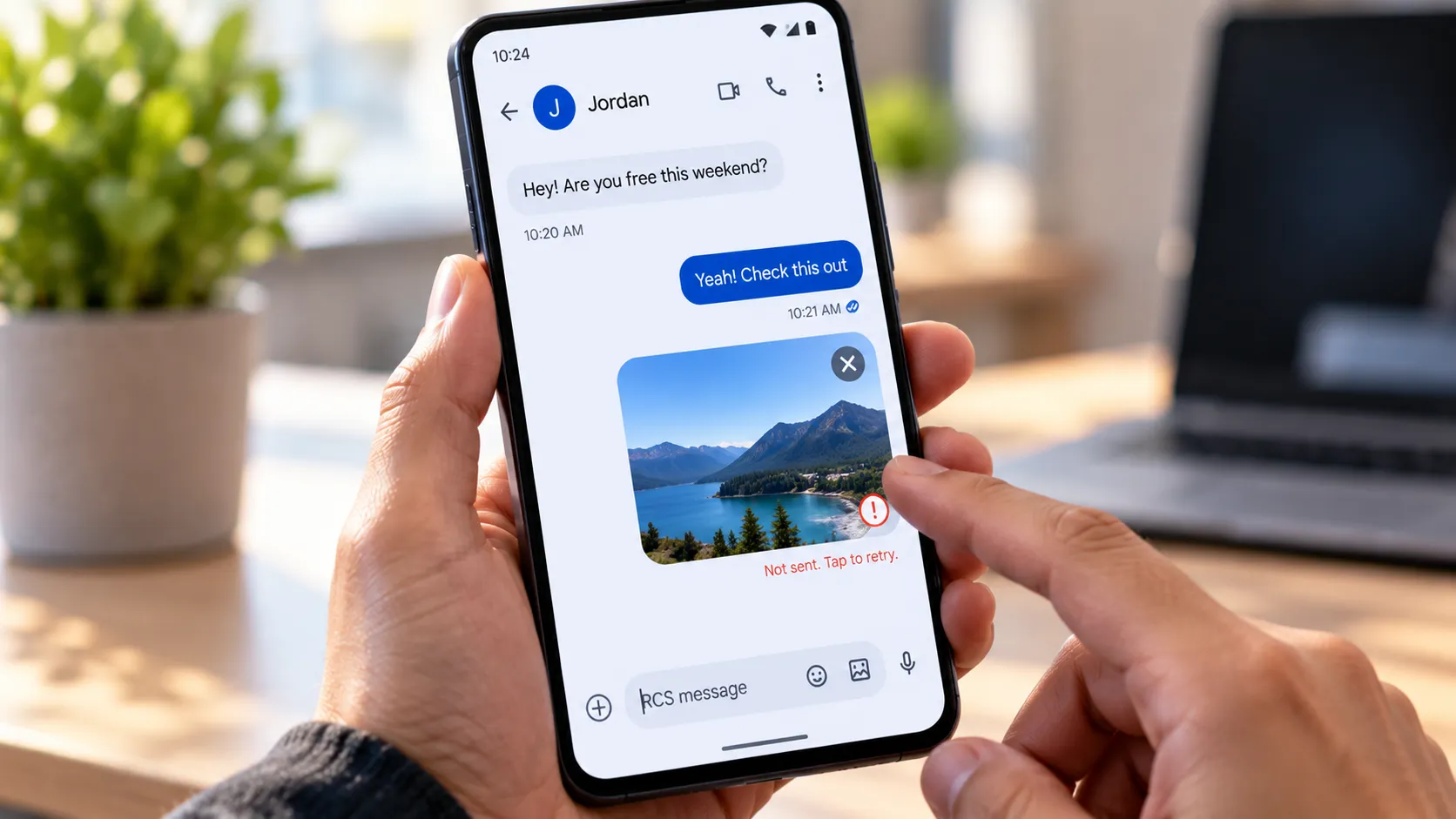
If your texts are going through fine but photos, videos, GIFs, or other media sit there unsent, you're not alone. Google has confirmed a bug causing disrupted RCS message delivery for a subset of Google Messages users and says a fix is rolling out now.
Google told Android Authority on Oct. 2 that the fix would reach everyone "over the coming weeks" and advised users to stay on the latest version of Google Messages. As of Oct. 13, Google has not announced that rollout as complete.
That statement confirms an RCS delivery bug exists. It does not confirm every detail users are reporting, including the specific pattern where plain text keeps working in the same conversation while media fails. That distinction still comes from user reports rather than Google itself.
A Pixel 10 Pro Fold owner said the trouble started after an August update, with media remaining undeliverable for two to four days before batches suddenly sent. A Pixel 8 owner described a similar problem involving links, photos, and videos, according to Android Central.
Android Authority also gathered reports involving GIFs, pictures, Photomoji, and stickers. Some affected users said media failed when sending to other Android phones over RCS but continued working when sent to an iPhone using RCS. Google has not confirmed that Android-to-Android pattern itself.
What to do when Google Messages RCS media is not sending
Start by checking whether ordinary text messages still send normally in the same conversation where media is failing.
If text works but photos, videos, GIFs, or other attachments remain stuck, that matches the user-reported pattern behind the current bug. It doesn't prove your phone is affected by exactly the same issue, but it makes the connection more plausible.
Next, update Google Messages through the Play Store. Google's own statement specifically tells affected users to stay on the most recent version while the fix rolls out.
If RCS still fails, Google officially supports falling back to SMS or MMS.
Go to Google Messages > profile picture > Messages settings > RCS chats > Resend messages and choose how failed messages should be resent.
Google also offers an Automatically resend as text (SMS/MMS) option when RCS isn't available.
There are two tradeoffs.
MMS generally compresses photos and videos, so image quality can drop compared with RCS. Google explicitly notes that carriers compress MMS media.
Google also warns that if you choose SMS with a link, the media may be accessible through a public link that isn't controlled by Google. That's worth knowing before using that fallback for anything sensitive.
MMS itself requires a working mobile-data connection and carrier support. Google's troubleshooting guide recommends checking data connectivity and APN settings when MMS won't send.
Multiple SIM cards add another possible complication, but the current Google guidance is more specific than simply saying RCS always uses the default calling line.
Google's RCS FAQ says that on a dual-SIM device, the SIM configured for calls should also be configured as the data SIM when troubleshooting RCS. Google Messages also now lets users check which SIM a conversation is using and switch SIMs from inside the thread.
Before reaching for a factory reset, stop at the simpler checks.
Affected users cited in the current reporting have already tried steps including restarting phones, clearing cache, force-stopping Messages, resetting networking, toggling RCS, and in some cases resetting the device without reliably fixing the problem.
That doesn't mean none of those steps can ever help an unrelated Messages problem. It does mean repeated factory resets are difficult to justify for a bug Google has already acknowledged and is actively fixing.
What Google has confirmed, and what's still user reports
Google's confirmation is deliberately broad.
A spokesperson told Android Authority:
"We are aware of a bug affecting a subset of Google Messages users that can lead to disrupted RCS message delivery."
Google added that it is rolling out a fix that should reach everyone over the coming weeks and told users to keep Google Messages updated.
That confirms:
An RCS delivery bug exists.
It affects only a subset of Google Messages users.
Google has developed a fix.
The fix is currently rolling out.
The rollout may take multiple weeks.
Google has not publicly identified:
The technical cause
Specific affected phones
Android versions
Google Messages app versions
Carriers
The number of affected users
Whether the failure is limited to media
Whether Android-to-Android RCS is uniquely affected
Whether the fix is app-side, server-side, carrier-side, or some combination
Android Authority's original reporting is more specific than Google's statement because it is based on user reports. Those users describe media such as GIFs, photos, Photomoji, and stickers failing to send while RCS is enabled.
Several reports also say the same media can be sent after falling back to SMS or MMS.
That's useful troubleshooting evidence, but it shouldn't be promoted into a Google-confirmed description of the bug.
Similar problems have happened before
A March 2025 post on Google's own Messages Community forum describes a similar symptom on a Samsung Galaxy A33: ordinary chat worked, but photos and images wouldn't send.
That user said the issue had lasted about a month and that uninstalling Messages and clearing the cache hadn't fixed it.
The post predates the current wave by well over a year. It shows that media-only sending failures have happened before on different hardware, not that today's bug has existed continuously since 2025.
Google also dealt with a different RCS media problem in 2025 involving slow or failed incoming media. That issue affected receiving rather than sending, and Google addressed it through server-side changes.
Again, that's useful context, not proof that the same repair mechanism applies now.
A separate 2026 RCS issue affected some Galaxy users after switching devices or carriers, with error code 3100 appearing during setup. Google said at the time that it was working with carrier partners on that problem.
That episode is also separate from today's media-sending bug. It does show that Google Messages RCS failures can involve carrier infrastructure as well as the app itself.
Why basic troubleshooting hasn't worked for everyone
The current reports point to a problem that isn't consistently cleared by local troubleshooting.
Android Authority says affected users tried restarting, clearing cache, force-stopping Messages, resetting network settings, and toggling RCS without reliable success. One user said clearing app storage helped, but it also removed their Photomoji tab and ability to create new Photomoji.
Android Central separately cites a Pixel 10 Pro Fold owner who reset the device several times without fixing the behavior.
None of that proves the bug is entirely server-side.
It does make repeatedly wiping app data or factory-resetting a phone a poor first response when Google has already acknowledged a wider delivery bug.
A sensible troubleshooting sequence is:
Update Google Messages.
Confirm RCS status under Messages settings > RCS chats.
Check whether plain text still sends.
Test another conversation if possible.
Use SMS/MMS fallback for urgent media.
Wait for Google's rollout before attempting destructive troubleshooting.
Google also specifically warns against repeatedly turning RCS chats off and back on without a reason, since doing so can remove you from RCS group chats.
How long the fix could take
Google's phrase is "over the coming weeks."
That isn't a guaranteed completion date.
The company announced the rollout on Oct. 2, and as of Oct. 13 there is no newer public Google statement saying every affected account or device has received the fix.
Google also hasn't said whether you'll know when your phone gets it.
Because Google told users to keep Messages updated, an app update may be involved. But the company hasn't said the repair depends exclusively on a Play Store version, and Google Messages features and fixes can also roll out through server-side changes.
That means seeing a new Messages version isn't proof the bug is fixed for your account, and not seeing one doesn't prove the fix hasn't reached you.
The practical test is whether previously failing RCS media starts sending normally again.
What to do now
Keep Google Messages updated and avoid jumping straight to destructive troubleshooting.
If photos or videos are stuck but ordinary texts still work, try Google's SMS/MMS resend option for anything urgent. Expect MMS compression, and be cautious with the SMS with a link fallback because Google warns that linked media may be publicly accessible outside its control.
On dual-SIM phones, check which SIM the conversation is using and make sure the call SIM and data SIM configuration matches Google's RCS guidance.
There is still no confirmed cause, affected-device list, or exact end date for the rollout.
Google says the fix is already going out. Until the company says that rollout is complete, or your own previously failing RCS media begins sending consistently again, treat the issue as still in progress rather than assuming another app reinstall, cache clear, or factory reset will solve it.












Comments
Be the first, drop a comment!