



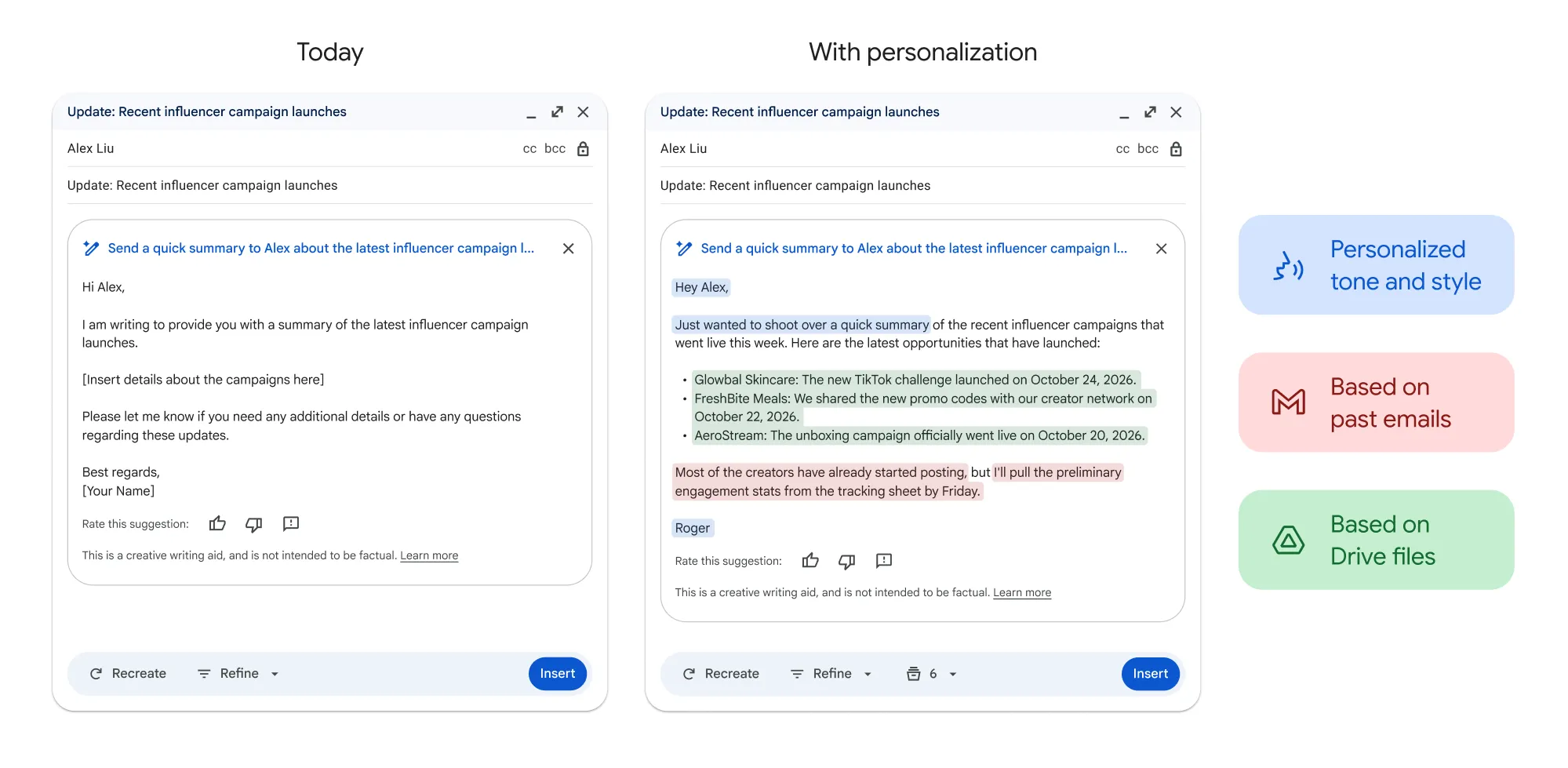
Gmail's Help me write now accepts custom follow-up instructions for revising an AI-generated email. Instead of choosing only broad controls such as Formalize, Friendly or Shorten, users can tell Gemini to make a specific change, such as adding a deadline or adjusting the tone.
The update expands on Gmail's existing AI drafting and refinement tools. After Gemini creates a message, the user can enter another instruction, review the revised version and decide whether to insert or send it.
How custom editing works
After generating a draft, enter another instruction in the Help me write prompt bar. Google suggests prompts such as "Make it more professional" and "Mention the Friday deadline."
Gmail then creates another version based on the request. Undo and Redo controls let users move between generated drafts without losing an earlier version.
Custom instructions work alongside Gmail's existing Help me write editing controls, including Formalize, Friendly and Shorten. The presets make broad changes, while a typed prompt lets the user describe a more specific revision.
For example, a user could ask Gmail to:
Add a meeting time or location.
Mention an approaching deadline.
Make a request sound friendlier.
Clarify what the recipient needs to do.
Remove a detail that is no longer accurate.
Google does not promise that a targeted instruction will leave every other sentence unchanged. Review the full revision before sending it, especially when the message includes names, dates, prices or commitments.
Personalized drafts can use Gmail and Drive
The custom editing option follows a separate Gmail update announced on May 7, 2026. That earlier release added topic contextualization from Gmail and Google Drive, along with tone and style personalization based on a user's previous emails.
Google expanded Help me write in May for eligible paid accounts. Topic contextualization can retrieve relevant details from Gmail and Google Drive based on the user's prompt, while tone and style personalization can model a new draft on emails the user previously wrote.
That means a generated email may already include information from an earlier conversation, travel confirmation or project document before the user begins refining it.
Google says tone and style matching works only when the draft is in English. Users can select Sources to see which emails and Drive files Gemini used to personalize the response.
Check any imported information before sending. Gemini could retrieve an outdated detail, misinterpret a document or include information that should not be shared with the recipient.
Where Help me write is available
Google provides Help me write instructions for Gmail on computers, Android devices, iPhones and iPads.
Eligible Google Workspace and Google AI plans can use the feature in multiple supported languages worldwide. Personal Google Accounts can use Help me write in supported languages, but Google currently limits that access to the United States.
The Gmail and Drive personalization features are available with these plans:
Google Workspace Business Starter, Standard and Plus
Google Workspace Enterprise Starter, Standard and Plus
Google AI Plus, Pro and Ultra
Google AI Pro for Education
For organizational accounts, Gemini for Workspace in Gmail and Workspace Intelligence access to Gmail must both be enabled before the personalization features will appear.
Availability can therefore vary by account type, region, language and workplace administrator settings.
When custom edits help most
Custom prompts are useful when an email is nearly finished but lacks a detail or uses the wrong tone. Asking Gemini to mention a deadline can be quicker than regenerating the entire message or rewriting it manually.
The feature can also help with follow-ups, scheduling emails, invitations and customer responses where one missing fact could change how the request is understood.
Gemini may still produce inaccurate or inappropriate information. Google advises users not to treat its suggestions as medical, legal, financial or other professional advice. It also tells enterprise users not to include personal, sensitive or confidential information when submitting feedback about a generated draft.
Before sending, check names, dates, prices, attachments and promised actions. Gemini can revise the wording, but the sender is responsible for the final message.















Comments
Be the first, drop a comment!