



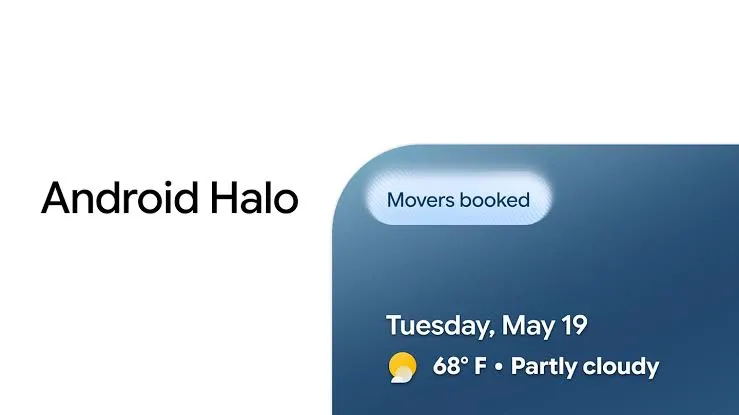
Google has carved out a slot in the Android status bar for AI agents, and right now there is no confirmed way to hide it. Android Halo, announced at Google I/O in May and explained in more detail this week, gives Gemini and other supported agents a fixed, dedicated location at the top of the screen, visible across apps while an agent is active. The Android Halo status bar indicator is designed to stay put. Whether users will have any say over that is the question Google hasn't answered.
Can you turn off Android Halo status bar clutter right now?
Google has not announced a way to hide, suppress, or configure the Halo indicator on stock Android. Google has announced the feature for later this year but has not announced a system-wide hide toggle, per-agent mute, or idle collapse state.
Code activity in PixelOS-AOSP, a custom ROM project based on Android's framework, shows that per-icon status bar controls are technically possible in Android-derived software. That is not the same as Google building those controls into stock Android. No Pixel-specific or stock Android equivalent has been announced.
9to5Google noted that no full public demonstration of Halo has taken place yet, which means a lot of the feature's practical behavior, including how it handles multiple concurrent agents, remains undocumented.
What Halo is and how it works
Halo is not a notification badge or a temporary alert. Google describes it as a dedicated status bar address: a stable location where Gemini or another supported agent can deliver progress updates, ask a follow-up question, or surface a result without pulling users back into the Gemini app, as described in Google's announcement. Google says the indicator can appear when an agent takes on a task, enters live mode, or sends a message, and it stays visible regardless of which app is open.
Google's Sameer Samat, president of Android, explained the rationale this week: agents running background tasks will need to check in with users, and Halo is the system-level surface for doing that without requiring a context switch. Google's rationale is that a fixed location can make agent updates easier to find across apps. A floating or app-scoped indicator would force users to hunt for it, which recreates the exact friction the feature is designed to eliminate.
Google also framed Halo alongside Privacy Dashboard upgrades that will let users review which AI assistants were active and which apps they accessed in the previous 24 hours. That connection positions Halo not just as a convenience layer but as part of a broader AI transparency effort, giving users visible evidence that an agent is working and what it's doing.
Why Android Halo status bar clutter may bother power users
An always-on indicator anchored at the top of every screen is consequential by design. A 2022 peer-reviewed study of 1,095 participants published in PLOS One found that small, persistent visual markers, notification badges in that case, systematically captured more clicks than identical icons without them, with results holding across all tested comparisons (all p-values < .001).
The study measures badges rather than status bar indicators, so it's context rather than proof. The underlying point stands: persistent visual signals at the top of every screen draw the eye. That's the feature working as intended.
For users who keep their status bar minimal, the gap in confirmed controls is a practical concern. There's a meaningful difference between the three types of possible controls that Google has not addressed:
A system-wide hide would let users disable the Halo indicator entirely
A per-agent mute would suppress it for one agent while keeping it active for another
A temporary collapse would shrink the indicator when an agent is idle, expanding only when there's something to communicate
Google has confirmed none of these. The distinction matters because each represents a different level of user authority over a feature that has been explicitly designed to persist. Users running multiple agents simultaneously have no documented answer for how concurrent indicators would be handled either.
What Android's architecture reveals about the plausibility of icon controls
Android-derived framework code in PixelOS-AOSP shows one working implementation of per-icon status bar controls. PixelOS is a third-party custom ROM, not a Google product, but it builds on the same underlying Android framework.
A commit pushed to the project earlier this year describes "Status bar tuner improvements" that include a dedicated "Status bar icons" settings page and a registered intent action, com.android.settings.action.STATUS_BAR_TUNER, designed to surface individual icon visibility controls through a standard Android settings interface.
Notably, that commit carries an internal authorship date of October 2017, despite being pushed in early 2026. The discrepancy suggests the code was originally written years ago and later incorporated into the PixelOS commit, rather than written fresh for it.
A second commit from late last year makes the technical approach more concrete: it references a per-icon visibility flag, Settings.Secure.STATUS_BAR_SHOW_VIBRATE_ICON, stored in Android's secure settings layer, where individual icon display preferences can be read and changed per user. If Google chose to implement a Halo toggle, it could theoretically use a similar secure-settings mechanism.
What this evidence does not show is that Google is building these controls into stock Android or that any Halo-specific hide option is planned for Pixel devices. Custom ROM projects may choose to expose similar controls before stock Android does, or independently of anything Google ships. Readers should treat this as evidence of architectural possibility, not a feature preview.
What to watch for when Google shares more details
Google said in its announcement that additional Halo capability details are coming later this year. The things worth watching for: whether any settings surface is disclosed for hiding or muting the indicator, how the feature behaves when multiple agents are active simultaneously, and whether idle-state behavior is documented.
Halo is positioned as a transparency infrastructure, giving users a consistent, visible record of AI activity. That framing only holds up if users have some ability to manage what they see. Google has confirmed more details are coming; what those details say about user controls will determine whether Halo reads as a tool for users or a permanent fixture imposed on them.












Comments
Be the first, drop a comment!