



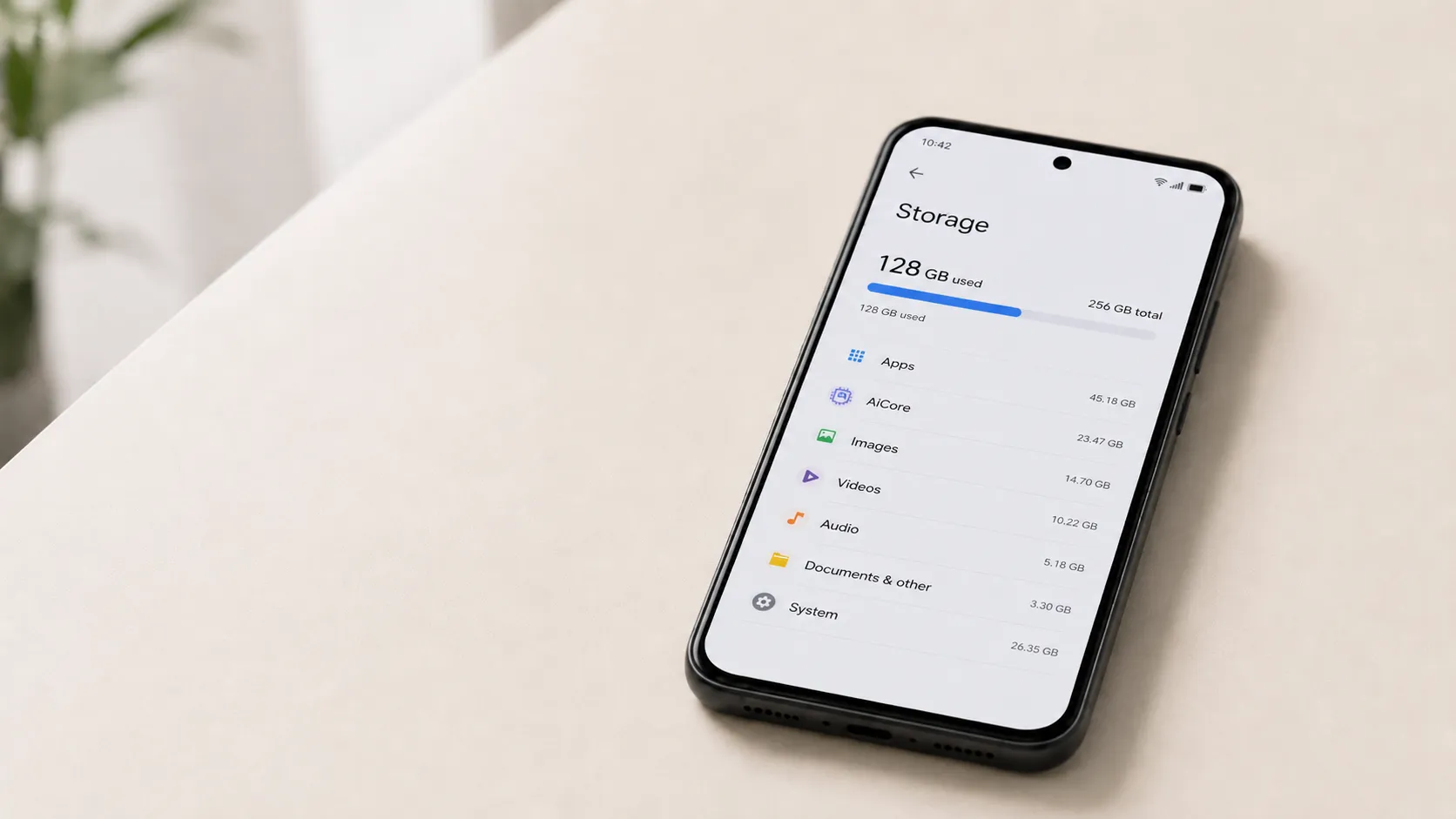
If you've opened your Android storage settings and found AICore consuming more space than expected, the explanation is straightforward: your phone is deliberately holding two copies of its AI model at the same time. This is intentional, temporary, and usually requires no action on your part. 9to5Google surfaced a Google support explanation on May 2, 2026, confirming that when a Gemini Nano update arrives, AICore keeps both the old and new versions on-device for up to three days while stability is verified. Once the update clears that window, the older copy deletes itself automatically.
But understanding why Google built it this way, what AICore actually does on your phone, and where the official explanation falls short requires a bit more unpacking.
What AICore does on Android
AICore is a system-level component that lets your phone run certain AI tasks directly on its own processor, without sending requests to a remote server. Rather than each feature shipping and maintaining its own separate model, they all use the one AICore manages, stores, and keeps updated.
The features it powers are ones most users encounter throughout a normal day. Google lists several examples of AICore-powered features, including:
Smart reply suggestions in WhatsApp, Line, and KakaoTalk through Gboard
Audio summarization in the Recorder app
Scam detection in messages
Automatic speech recognition for audio-to-text transcription
Advanced grammar and proofreading as you type
On-device translation
AICore is available on Android 14 and higher, but feature availability varies by device and manufacturer, so this is not a universal Android issue. Pixel devices running Google's Tensor chips are the clearest examples of supported hardware; Gemini Nano-powered features first appeared on the Pixel 8 Pro in December 2023, according to Google.
The reason the model has to live on the device is a direct consequence of that design choice. Running AI locally means the trained model file — the thing that actually performs the inference — must be stored on the hardware that uses it. That local file is what AICore manages, updates, and during an update period, temporarily duplicates. The storage cost follows directly from keeping the processing on the device rather than routing requests to a cloud backend.
Why AICore storage spikes during updates
When Google issues a Gemini Nano update, AICore does not overwrite the existing model in place. Both versions coexist on-device for up to three days while stability is verified. What users see in Settings during that period is that redundancy window made visible — not a permanent expansion, and not an error. Once the system confirms the update is stable, the extra storage clears automatically, according to Google's AICore documentation.
The logic is similar to keeping a local fallback available during an update. Google's documentation frames the dual-copy window as a "fail-safe" that lets the phone instantly revert to the older version if something goes wrong, rather than forcing the device to re-download what Google describes as "gigabytes of data." A live overwrite with no local fallback would mean a failed update leaves the device without a working model until it can pull the entire replacement file again. The temporary storage cost is the price of avoiding that outcome.
What Google has disclosed:
AICore temporarily keeps both model versions for up to three days
The older copy deletes itself once the update is confirmed stable
The mechanism is intended as a fail-safe against failed updates
What Google has not disclosed:
How large Gemini Nano is on supported devices
How much storage the dual-copy peak occupies in practice
How frequently the update cycle repeats
Those gaps matter most to users already running close to capacity.
What to do if AICore storage stays high
The dual-model window is designed to resolve on its own, but it helps to know what to look for before deciding whether to act.
First, check when the spike appeared. If AICore grew larger within the past three days, and your device recently installed a system update or AICore update through Google Play system updates, the behavior is expected. Give it the full 72-hour window before drawing any conclusions.
If the elevated figure persists well beyond three days without resolving, that falls outside what Google's current documentation addresses. In that case:
Note the exact storage figure shown for AICore in Settings (Settings > Apps > See all apps, then locate AICore)
Record your device model and Android version
Check whether any pending system updates are waiting to complete, since an interrupted update could stall the cleanup process
If nothing resolves it, that information will be useful if you contact Google support or report the issue through the Feedback option in Settings
One thing worth avoiding: clearing data or cache on AICore or other system AI components unless a support channel specifically advises it. AICore is not a standard app, and removing its data could disable the on-device features that depend on it until a full re-download completes.
The trade-off behind on-device AI
On-device processing delivers three concrete differences compared to cloud-dependent features. Google's AICore documentation describes all three: local processing removes the latency of a cloud round-trip for a faster response; features like text summarization and smart reply continue working with no network connection, including in airplane mode; and data processed by the local model stays on the device rather than being transmitted to Google's servers.
Those are meaningful differences in how the features actually work. On the privacy point specifically, the claim comes from Google's own documentation; independent verification of the implementation is not available in the public record.
Storage pressure has real consequences for users operating close to capacity. Google Play's developer guidance says app size can affect install and uninstall metrics, and Play Console tracks both active devices and uninstalls on devices with less than 2 GB of free storage remaining. Apps above 200 MB also trigger a non-blocking warning dialog for users installing on mobile data. AICore operates as a system component outside those Play Store constraints, but the underlying tension is similar: a significant temporary storage increase on a device already tight on space can affect what else fits on that phone.
The transparency gap compounds this. A person checking Android settings has no disclosed baseline for what AICore should normally occupy, no figure for what the peak looks like during an update window, and no way to calculate how much headroom their device needs before an update cycle begins. Without those numbers, a user on a constrained device cannot evaluate whether the trade-off works for their specific hardware.
What Google still hasn't explained
The core answer is settled. Temporary AICore storage spikes are normal, deliberate behavior. The dual-model window lasts up to three days, clears automatically, and signals a working update mechanism rather than a malfunction.
The remaining gap is narrower but consequential. Google's explanation covers the mechanism clearly and skips the numbers entirely. Gemini Nano's baseline on-disk size, the typical peak storage during a redundancy window, and the cadence of update cycles are all undisclosed. Google Play's own guidance tracks uninstalls on low-storage devices as a distinct metric which signals that Google understands storage pressure as a real driver of user behavior. Publishing the actual AICore size figures would let users on constrained devices make an informed judgment rather than guessing.
AICore is system infrastructure for Android's on-device AI features, so future model updates may bring similar temporary storage windows. As more Android features route through on-device inference, that pattern could become a recurring cost rather than a one-time event. For users on lower-storage hardware, the practical question is whether their device can absorb these update windows without clearer guidance from Google.
For a deeper look at how on-device processing works and where Google still relies on the cloud, the Google on-device processing explainer covers the hardware architecture and trade-offs in more detail.









Comments
Be the first, drop a comment!