



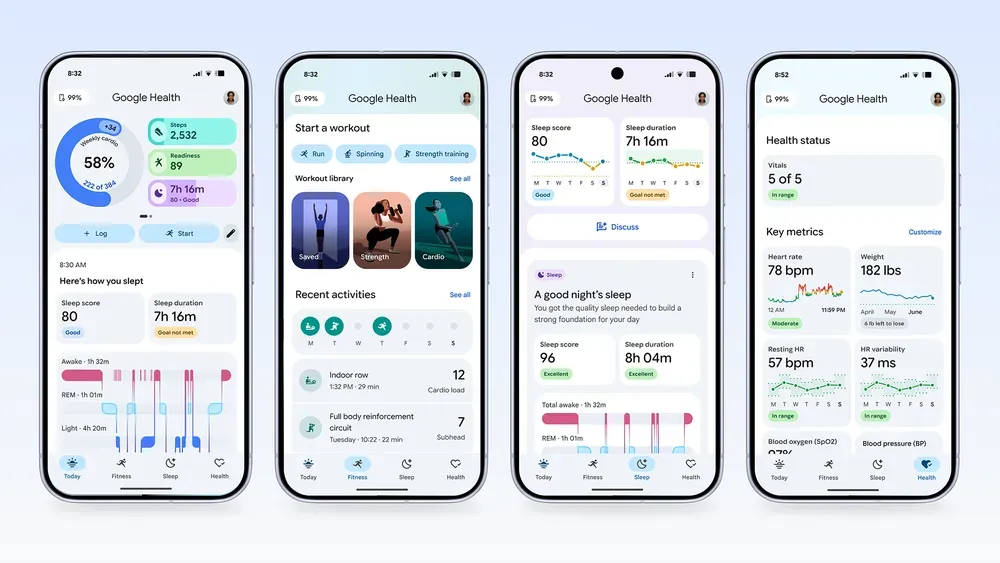
Google has begun notifying users that Fitbit app versions older than 5.0 will stop being supported on Android and iOS on July 15, 2026, ending a workaround some holdouts used to avoid the Google Health redesign.
The same date also matters for legacy Fitbit account users. Under Google's setup requirements, Fitbit account users need to move to a Google Account to access the Google Health app, and accounts that are not migrated by July 15 will be deleted.
The cutoff closes an Android-specific escape hatch that surfaced after Google began replacing the Fitbit app with Google Health. Some users sideloaded older 4.x Fitbit APKs, disabled Play Store auto-updates, and kept the old interface running.
Anyone still on a pre-5.0 build has until July 15, 2026, to update before support ends.
What stops working on July 15
The cutoff applies to Android and iOS app versions older than 5.0. After July 15, those older builds are no longer expected to work reliably with Google's Fitbit services.
On Android, sideloading will still be technically possible. Old APK files may still install after July 15, but Fitbit depends on Google's servers for logins, syncing, device data, and account features. Once support ends, an old build may open without reliably syncing, connecting to a device, or keeping account features available.
The iOS risk is different. iPhone users cannot sideload APKs, so anyone still on a pre-5.0 iOS build likely declined the App Store update or had automatic updates turned off. The July 15 cutoff still applies.
Google has not detailed the exact failure modes. The company's notice says support for older builds ends July 15, but it does not spell out whether login breaks first, syncing stops immediately, or pairing issues appear over time.
Why users kept the old app
Google introduced Google Health on May 7, saying the Fitbit app would become Google Health and begin rolling out to users on May 19 as an app update. Google said existing users would not need to download a separate app and that their data would transition automatically.
The backlash centered on layout changes, missing shortcuts, tracking complaints, and the lack of an official way back to the old interface.
The Verge found that some routine data now takes more taps to reach. Exercise logs that were easier to find in Fitbit sit deeper in Google Health, while basic stats appear in a smaller area near the top of the screen and the Gemini-powered Health Coach takes up prominent space below.
The coach can be disabled through Feature Privacy Controls, but disabling it does not remove the space it occupies. For users who mainly open Fitbit to check steps, sleep, and trends, the old app was not nostalgia; it was the faster workflow.
Google Health also adds features the old Fitbit app did not emphasize, including four tabs for Today, Fitness, Sleep, and Health; support for hundreds of third-party apps and devices; and medical-record syncing in the U.S. Some users have found the AI coach useful, but the broader platform is also what pushed some holdouts back toward the old app.
What to check before the deadline
For continued syncing and account access, update the Google Health app before July 15, 2026, and check for any pending firmware updates on your Fitbit or Pixel Watch. Google Health requires Android 11 or later on Android phones and iOS 16.4 or later on iPhones.
On Android, re-enable automatic updates or update through the Play Store. On iOS, install the latest version from the App Store and make sure automatic updates are turned on if you do not want to manage future cutoffs manually.
If you still use a legacy Fitbit account, check your account status first. Fitbit account users need to move to a Google Account to keep using Google Health, and unmigrated accounts are scheduled for deletion on July 15. If you do not want to migrate, download or delete your Fitbit data before that date.
Android users still running a sideloaded 4.x build should check the current app version, uninstall the old APK, install Google Health from the Play Store, and re-enable automatic updates. Reinstalling a 4.x APK after July 15 may still be possible, but it is unlikely to restore syncing or account access once server support ends.
Google has not announced an official rollback option. After the May launch backlash, the company outlined fixes for workout tracking, sleep scores, Fitbit Air connectivity, dashboard customization, and workout-data inconsistencies. Android Central reported that Fitbit Air's first software update started rolling out in late June, but the changelog only cited bug fixes and general improvements, so users should not assume every complaint has been resolved.
Users mainly bothered by the AI coach can disable it through Feature Privacy Controls, though that does not restore the old Fitbit layout or remove the coach's screen space.
Why the workaround is really ending
The sideload workaround worked because older builds could still reach Google's servers for login, syncing, and account features. Once support ends, a pre-5.0 APK may still install, but it stops being a reliable workaround.
July 15 is the cutoff for old Fitbit app holdouts, not the end of every Google Health transition. Google is still folding more health and fitness services into the app, including a planned Google Fit migration later in 2026.
For Fitbit users who only want a fast dashboard for steps, sleep, workouts, and trends, the choice is narrower now: update to Google Health, migrate or export legacy account data, and adjust the new layout as much as Google allows.















Comments
Be the first, drop a comment!