





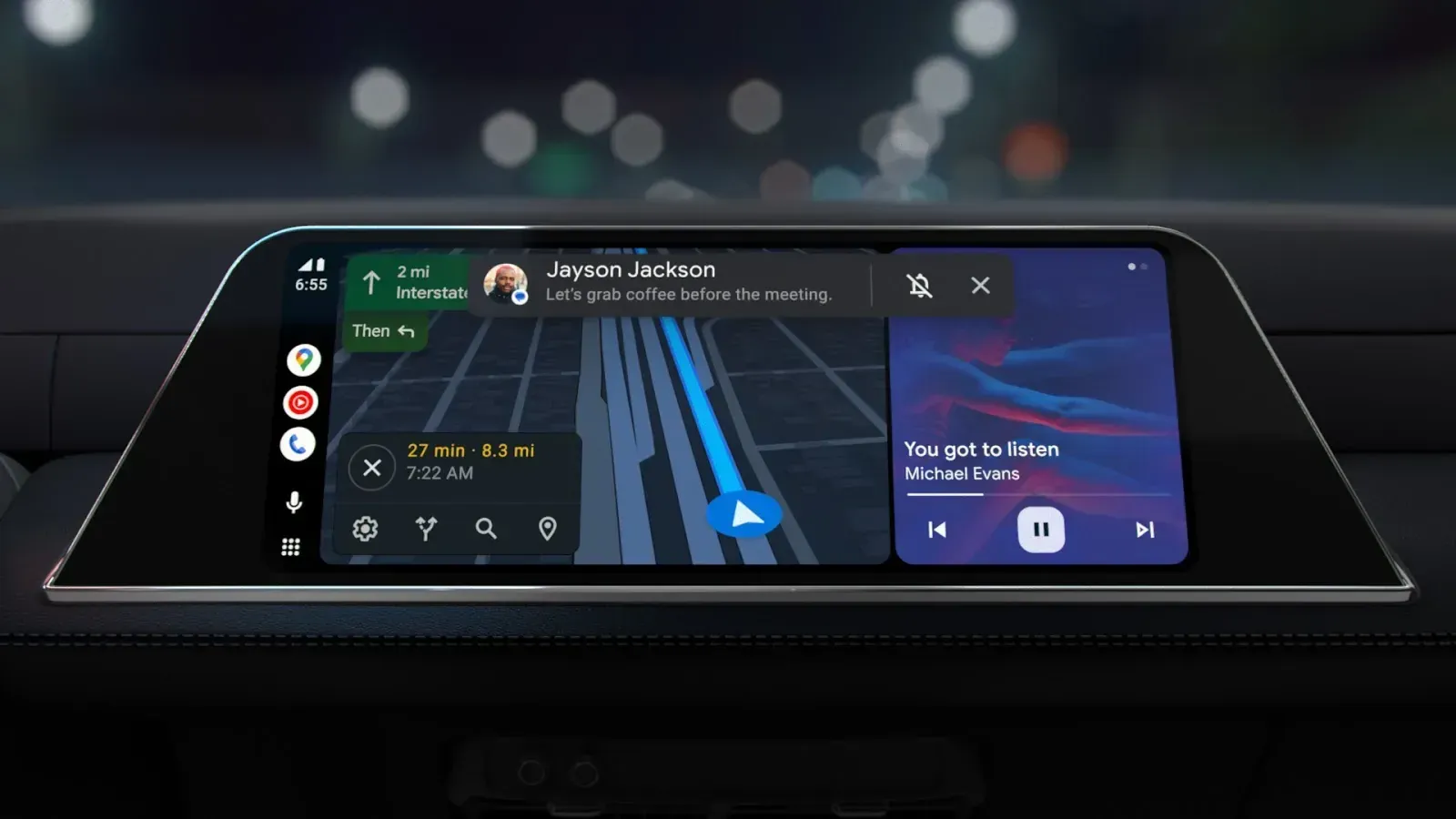
For months, some Android Auto users have been glancing at their car dashboards only to find that the familiar cellular signal bars have disappeared. Their phones may still have reception, and navigation and music may work normally, but the indicator that once showed their connection strength is nowhere to be found.
Google is finally addressing the problem. The company has confirmed that a fix is rolling out, and 9to5Google reported on October 16 that more drivers were seeing their signal bars return. Android Auto 17.8 appears to be helping, although the restoration is not yet guaranteed for everyone.
The missing icon is a relatively minor glitch, but it removes a useful piece of information from the dashboard. When a map stops loading or music begins buffering, drivers can no longer glance at Android Auto to check whether weak cellular reception might be responsible.
Android Auto 17.8 is bringing the signal bars back
Android Auto normally displays the connected phone's cellular signal strength alongside other status information, including battery level and the time. The signal bars provide a quick indication of reception without requiring drivers to reach for their phones.
Reports of the indicator disappearing date back to at least March 2026. For some drivers, the bars vanished entirely. Others experienced an intermittent problem, with the indicator returning after an update or troubleshooting attempt before disappearing again.
The issue has not affected every Android Auto user, and reports have emerged across different phones and vehicle infotainment systems. There is no confirmed list of affected manufacturers, models, or regions.
Android Auto 17.8, which reached the stable release channel after beta testing, has become the version most closely associated with the fix. Several users have reported that their cellular indicators returned after updating, suggesting that the software release is helping restore the missing display element.
However, Google has not explicitly identified version 17.8 as the sole requirement for receiving the fix. Some users have continued reporting missing signal bars despite installing the update, while others have seen the indicator return.
That distinction is important when checking your own dashboard. Having Android Auto 17.8 installed does not necessarily mean anything is wrong if the bars are still absent. The fix may be reaching users at different times, even when they are running the same app version.
Missing signal bars don't necessarily mean lost service
A missing cellular indicator can look alarming, particularly when drivers rely on Google Maps, Waze, or streaming apps during long trips. But the disappearing icon appears to be a status-display problem rather than a failure of Android Auto's underlying connection.
Affected drivers have reported that navigation, music, and phone calls continued working normally even when the signal bars were gone. The display simply stopped showing information about the phone's cellular reception.
It is worth distinguishing that behavior from an actual connectivity problem. Android Auto can continue displaying navigation information even when mobile reception is poor, particularly when map data is already available. Streaming music or refreshing traffic conditions, however, may still require a working data connection.
If your phone has reception and Android Auto continues responding normally, the missing bars are consistent with the bug Google is fixing. There is no evidence that the absent indicator itself causes cellular service to fail.
A different set of symptoms requires different troubleshooting. If Android Auto repeatedly disconnects, audio cuts out, or navigation stops responding, check the phone's mobile connection and the wired or wireless connection to the vehicle. Restoring the indicator is not a confirmed solution for those issues.
What Google confirmed — and what remains unclear
Google representative Mishaal Rahman acknowledged the missing cellular indicator in an Android Auto Reddit discussion, confirming that the company was distributing a fix but that it was not yet widely available.
Rahman also suggested enrolling in the Android Auto beta program for earlier access. However, the program was reported to be full when Google made the announcement, limiting its usefulness for drivers looking for an immediate solution.
Google's confirmation established that the disappearing indicator was a recognized problem, rather than an intentional interface change. It did not, however, explain what caused the icon to vanish or provide a date when the restoration would reach every affected device.
The method of delivery also remains uncertain. Google has not clarified whether the fix is contained entirely within an Android Auto app update or whether some devices must receive a separate server-side change.
Android Authority reported on October 16 that a combination of app updates and server-side controls could explain the uneven availability. Such an arrangement would allow Google to enable the restoration gradually, but the company has not confirmed that this is how the fix works.
What is clear is that more users have reported successful results since the initial announcement. Version 17.8 remains a sensible starting point for checking whether the problem has been resolved, even though installing it does not guarantee the bars will immediately reappear.
How to get your missing Android Auto signal bars back
There is no confirmed manual switch that forces the cellular indicator to return. Still, a few checks can help determine whether your phone has received the relevant update or whether the issue needs separate troubleshooting.
Follow these steps while safely parked:
Check your phone's cellular reception. Look at the signal indicator directly on your phone. If mobile data, calls, and navigation are working normally, the missing dashboard bars may be the display bug Google has acknowledged.
Update Android Auto through Google Play. Open the official Android Auto listing and install any available update. Android Auto 17.8 has been associated with the restoration, but a newer available version may also contain the relevant changes.
Find your installed Android Auto version. On most Android phones, open Settings → Apps → Android Auto and look for the version information. You can also open Android Auto settings and scroll to the bottom. Menu names and locations vary between manufacturers.
Reconnect your phone to the vehicle. After updating, disconnect Android Auto and reconnect it while parked. Check the area of the dashboard that normally displays your phone's battery and cellular status.
Clear Android Auto's cache if the bars remain missing. Go to Settings → Apps → Android Auto → Storage & cache → Clear cache, if your phone offers that option. Some users have reported temporary improvements after clearing application data or cache, but this is not a confirmed permanent repair. Avoid selecting Clear storage or Clear data unless you intend to reset the app's saved settings.
Check again after subsequent updates. If the icon has not returned, keep Android Auto updated through Google Play. Google's rollout may take additional time to reach some devices, and repeatedly reinstalling the app is unlikely to accelerate a server-controlled change, if one is involved.
These checks are consistent with the update and version-checking guidance published by TechRadar in its October 6 troubleshooting guide.
Sideloading Android Auto from a third-party source is another option discussed in some reports, but it introduces unnecessary installation and compatibility risks for a problem that generally affects the display rather than the underlying connection. Waiting for the official Play Store release is the safer approach.
If the indicator returns, no additional action is needed. If it remains missing while your phone and Android Auto otherwise work normally, there is little reason to reset your phone, replace a connection cable, or change vehicle settings solely because the signal bars are absent.
Google has started correcting an issue that left drivers without a familiar reception indicator, and the growing number of successful reports suggests the rollout is making progress. Until the fix reaches every affected dashboard, the phone itself remains the more reliable place to check cellular strength. The missing bars may be frustrating, but they do not necessarily mean the connection behind them is gone.









Comments
Be the first, drop a comment!