





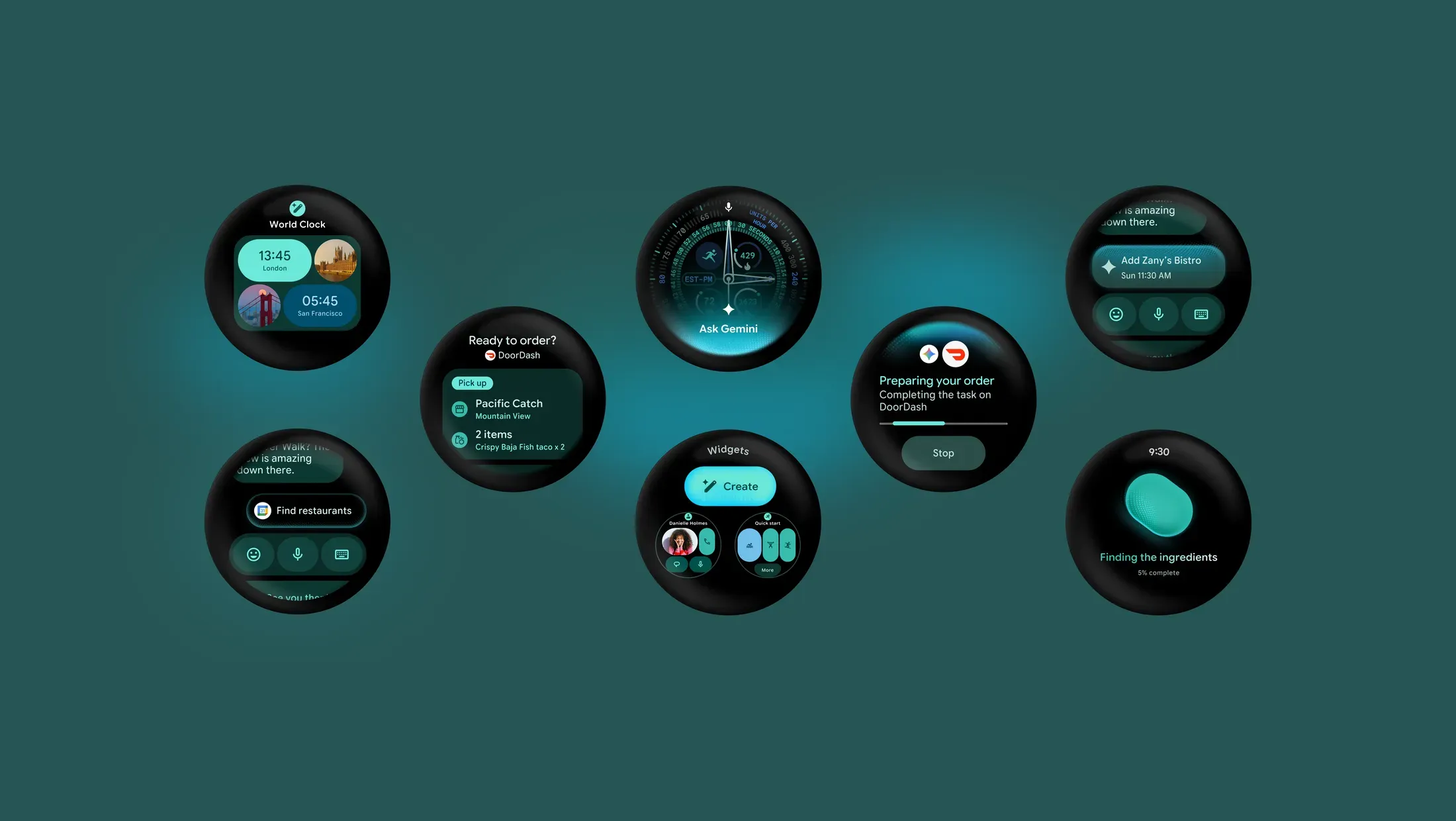
Wear OS 7 began rolling out on June 16, 2026, starting with Pixel Watch 2, Pixel Watch 3, and Pixel Watch 4, The Verge reported. If you have one of those watches, the update brings practical changes first: Live Updates, better battery efficiency, easier audio-output switching, Wear Widgets support, and expanded safety features.
The bigger AI features are not part of the initial rollout. In a June 16 Wear OS 7 post, Google said Gemini Intelligence is coming to select Wear OS 7 devices later in 2026, but it has not shared a firm date or full eligibility list.
That makes Wear OS 7 a two-part update. The features available first make the watch more useful at a glance. The Gemini tools Google previewed still depend on device support, privacy details, and a release window narrower than "later this year."
Which watches get Wear OS 7 first?
The confirmed rollout list is short. Pixel Watch 2, Pixel Watch 3, and Pixel Watch 4 are first in line for Wear OS 7. The original Pixel Watch is not included in the initial rollout, and non-Google watchmakers have not published broad Wear OS 7 timelines yet.
Here's the current breakdown:
Pixel Watch 4: rolling out
Pixel Watch 3: rolling out
Pixel Watch 2: rolling out
Original Pixel Watch: not included
Samsung Galaxy Watch models: no confirmed stable Wear OS 7 rollout list yet
OnePlus, Xiaomi, Oppo, and other Wear OS watches: no confirmed Wear OS 7 timeline yet
If the update does not appear immediately on an eligible Pixel Watch, check your watch settings again later. Software rollouts often move in stages.
The original Pixel Watch is not included in the Wear OS 7 rollout. It was also absent from Verizon's Wear OS 7 update list, which named Pixel Watch 2, Pixel Watch 3, and Pixel Watch 4 but not the first-generation model, Android Central reported. That makes the original Pixel Watch a weak choice if long-term Wear OS updates are your priority.
Samsung is the main watch brand to monitor next. One UI 9 Watch is expected to bring Samsung's version of Wear OS 7 to future Galaxy Watch models, but Samsung has not published a confirmed stable rollout list. Recent reporting around a redesigned Galaxy Wearable app points to upcoming Samsung watch software changes, but it is still not an official Wear OS 7 eligibility chart for existing Galaxy Watch owners, Android Central reported.
If you have a OnePlus, Xiaomi, Oppo, or other Wear OS watch, wait for your watchmaker's own update announcement before planning around Wear OS 7.
What Wear OS 7 adds now
The first Wear OS 7 rollout is mostly about three everyday upgrades: live status cards, audio controls, and battery efficiency.
Live Updates brings real-time status cards to the watch. Sports scores, food delivery ETAs, ride progress, and workouts can appear on your wrist without forcing you to keep reopening an app. It is the kind of feature that makes more sense on a watch than on a phone because it is built for quick checks.
The media output switcher lets you change where audio plays from your wrist. For example, you can move playback between earbuds and a speaker without reaching for your phone. The feature will be most useful if you already use Google-connected audio devices, but the basic idea is simple: your watch becomes a faster remote for nearby devices.
Battery improvements are also part of the update. Google says average users upgrading from Wear OS 6 to Wear OS 7 can expect up to 10% better battery life. Treat that as Google's own estimate, not an independent test result. The "up to" matters, and your results will depend on watch model, apps, notifications, display settings, workouts, and LTE use.
Smaller Wear OS 7 changes to know
Wear OS 7 also brings changes that may not feel huge on day one but should matter more as apps update.
Wear Widgets gives developers a newer way to build glanceable watch experiences. Instead of relying only on older Tiles, apps can support more dynamic widgets. Watches running Wear OS 4, Wear OS 5, and Wear OS 6 can still display those widgets as full-screen tiles, so app makers do not have to break older watch support immediately.
Emergency Sharing is expanding on Pixel Watch. If the watch detects a fall, loss of pulse, or car crash, it can now notify selected emergency contacts in addition to emergency services. Availability can vary by device, region, and safety feature, so check your Safety & emergency settings after updating.
Gemini features are still coming later
The most ambitious Wear OS 7 features are not live yet. Google says Gemini Intelligence will arrive on select Wear OS 7 devices later in 2026, but it has not confirmed exactly which watches will get the full feature set.
Create My Widget is supposed to let you describe a watch dashboard in plain language, such as a widget for your next meeting and the weather, and have Gemini build it. That could make watch customization easier if you do not want to dig through menus or build widgets manually.
Gemini is also supposed to handle multi-step tasks from the watch. Google's examples include reserving a fitness class or placing an order, with Gemini moving through the steps instead of making you open each app yourself.
The privacy-sensitive piece is Personal Intelligence, which could use data from Google apps, including Gmail, Search, Docs, and chat history, to make suggestions more personal. That is exactly why the missing details matter. Until Google explains device eligibility, account requirements, privacy controls, and whether any features require a subscription, Gemini Intelligence should be treated as a preview, not a reason to buy a watch yet.
What to do based on your watch
If you have a Pixel Watch 2, Pixel Watch 3, or Pixel Watch 4, check for Wear OS 7 in your watch settings. The first rollout gives you Live Updates, the media output switcher, Wear Widgets support, Emergency Sharing changes, and Google's claimed battery-efficiency improvements.
If you have the original Pixel Watch, do not expect Wear OS 7 unless Google changes course.
If you have a Samsung, OnePlus, Xiaomi, Oppo, or other Wear OS watch, wait for your watchmaker's official update list. Wear OS 7 is live on Google's supported Pixel Watches first, but the broader Wear OS ecosystem is still catching up.
The main feature to watch next is Gemini Intelligence. Until Google names the eligible devices and privacy controls, Wear OS 7 is best treated as a practical Pixel Watch update, not the full AI-watch upgrade Google previewed.











Comments
Be the first, drop a comment!