



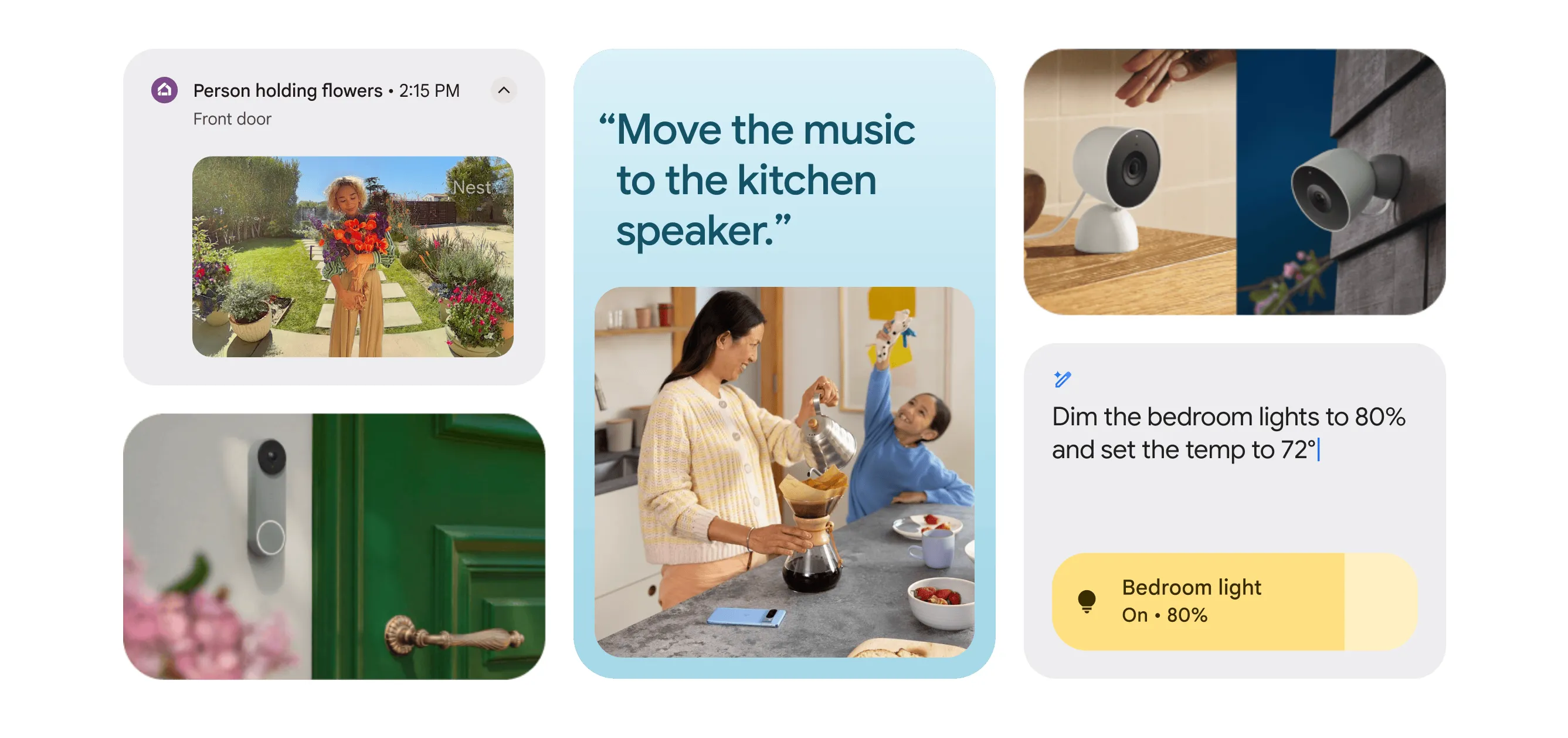
Code surfaced inside the Google Home iOS app this week suggests the upcoming Home Display may be less a Nest Hub successor than a Google smart display with camera features borrowed directly from Nest Cam. The latest Google Home Display Nest Hub Max camera findings, analyzed by Android Authority, describe recording tiers that mirror existing Nest Cam subscriptions exactly: a free event-history window, with longer event history and continuous recording tied to Google Home Premium tiers.
Google has not confirmed the product exists. But the specificity of those tiers — not vague camera support, but the exact subscriber benefit structure of live Nest Cam products — makes them harder to read as placeholder strings.
The Nest Hub Max had a camera for video calls and face recognition. What the code describes here is a security monitor that happens to have a screen. That distinction changes where you'd put the device, what you'd pay for it, and what questions would need answering before you bought one.
What the code says and where it stops
The leak is credible on the feature direction. It is silent on the hardware specifics that would determine whether this device is genuinely useful or quietly invasive.
The signals from Android Authority's analysis are concrete:
Camera recording follows Nest Cam monetization: a free event-history window, with longer cloud history and continuous recording apparently tied to paid Google Home Premium tiers.
Audio monitoring runs separately from the camera. The microphone would log noise-triggered events independently, a function no current Google display offers.
Users can reportedly disable recording entirely and use only live view. That is the one opt-out the code references.
What the code does not address is where the harder questions live. There is no indication whether the camera supports video calling, which was the primary use case for the Nest Hub Max's camera. No physical shutter is mentioned, nor an indicator light, nor any detail on whether footage is processed locally or sent to Google's cloud. These are not edge-case concerns. They determine whether the device belongs in a kitchen, a shared living room, or neither.
App code in Google's ecosystem reliably surfaces feature directions. The Nest Cam recording structure appearing here is a credible signal of product intent. Hardware details can still shift before a device ships. Treat the camera-as-Nest-Cam framing as a likely design direction, not a spec sheet.
Google Home Display event recording looks a lot like Nest Cam
The practical gap between what the Nest Hub Max offered and what the code describes is wide enough to change the product's entire category.
The Nest Hub Max used its camera primarily for Duo video calls and face recognition that personalized the ambient display based on who was in the room. Neither capability appears in the current findings. What does appear is security-oriented: event detection, audio logging, cloud history tied to a subscription tier.
For a buyer, that reshapes the placement decision. A camera-equipped display in a kitchen could serve as a back-door monitor, a home office log, or a pet camera, all while running smart display functions like recipes, timers, and home controls. In a living room, the same device raises a harder question: whether always-on monitoring in a shared space is something everyone there has agreed to.
The privacy checklist for cautious buyers is short, and almost none of it is answered yet. A physical shutter would let users block the lens without opening an app. An LED indicator tied to camera activity would make the monitoring state visible. Clarity on local versus cloud processing would determine how much the device knows about daily household patterns. The code confirms one control: recording can be turned off. Whether that is enough depends on where the device ends up and who put it there.
Why a camera-first display makes strategic sense for Google right now
The camera framing fits a deliberate narrowing of what Google has decided Nest is for.
After briefly expanding Nest into security systems and door locks, Google has pulled back to the categories where the brand has the most traction: cameras and thermostats. A display built around Nest Cam functionality is the logical extension of that retreat, combining the brand's strongest hardware category with a smart display form factor Google has neglected since the Nest Hub (2nd Gen) launched in 2021.
The subscription structure reinforces the logic. Advanced Gemini features, including AI-powered notifications, video history search, and Ask Home automations, are gated behind Google Home Premium, which starts at $10 per month and is also bundled with Google AI Pro and Ultra subscriptions. The Home Display's camera recording tiers would add another path to that subscription: three free hours of event history is functional, but meaningful security coverage requires Premium. The structure appears set up to push heavier users toward Google Home Premium.
Google Home CPO Anish Kattukaran signaled this direction last year, confirming the company remains committed to smart displays and would have more to share "soon" as Gemini becomes more deeply integrated into the ecosystem. A Home Display built natively for the Gemini-plus-Premium platform could become the first Google display marketed around that combined Gemini and subscription stack.
The execution risk: Gemini has to actually work
The strategic case for the device is coherent. The software experience that would have to carry it is still unproven.
Gemini for Home began replacing Google Assistant on existing speakers and displays in early access last October. If the Home Display is intended as the flagship endpoint for that platform, the voice assistant experience needs to be noticeably better than what early testers encountered. One Android Authority writer who enabled Gemini across two Nest Audios, a Nest Hub, and a Pixel Tablet during the preview described the result as wanting "a refund," the outlet reported in May. That is one tester on pre-release software; preview quality rarely reflects a finished product. It is, however, the only hands-on account in the record.
The inventory picture sharpens the stakes. Three of four Nest Hub color options are sold out on the Google Store, the Nest Hub Max is available in only one color, and the Pixel Tablet is out of stock entirely, Android Authority reported. Google's smart display shelf looks thin. A new flagship that ships with a rough software experience would not fix that.
Who should pay attention and what's still missing
The leak matters differently depending on where you sit.
Nest Hub Max owners have a genuine step up in camera capability here: Independent audio-event logging could expand on the Nest Hub Max's existing Nest Cam functionality. But video calling does not appear in the current findings, and if that was the primary use case, the code represents a regression until confirmed otherwise.
People waiting on a new Google display would be looking at the first new hardware in five years and the first device built for the Gemini-plus-Premium platform from day one, rather than updated to support it. The code suggests development is active, but it does not establish a launch window. Price is the remaining unknown.
Security-minded Home users get the most interesting case: a device that could replace both a Nest Cam and a smart display in a single unit. Whether the privacy controls are adequate is the deciding question. A physical shutter, an indicator light, and clarity on local versus cloud processing would make this an easy recommendation. The code shows one control. That leaves too much unanswered.
When Google confirms the device, the recording tiers and monitoring capabilities described in Android Authority's analysis this week are high-confidence signals of product direction. Price, screen size, video calling support, privacy hardware, and local processing are what the official announcement needs to address. The code has narrowed the field considerably. It has not closed it.















Comments
Be the first, drop a comment!