



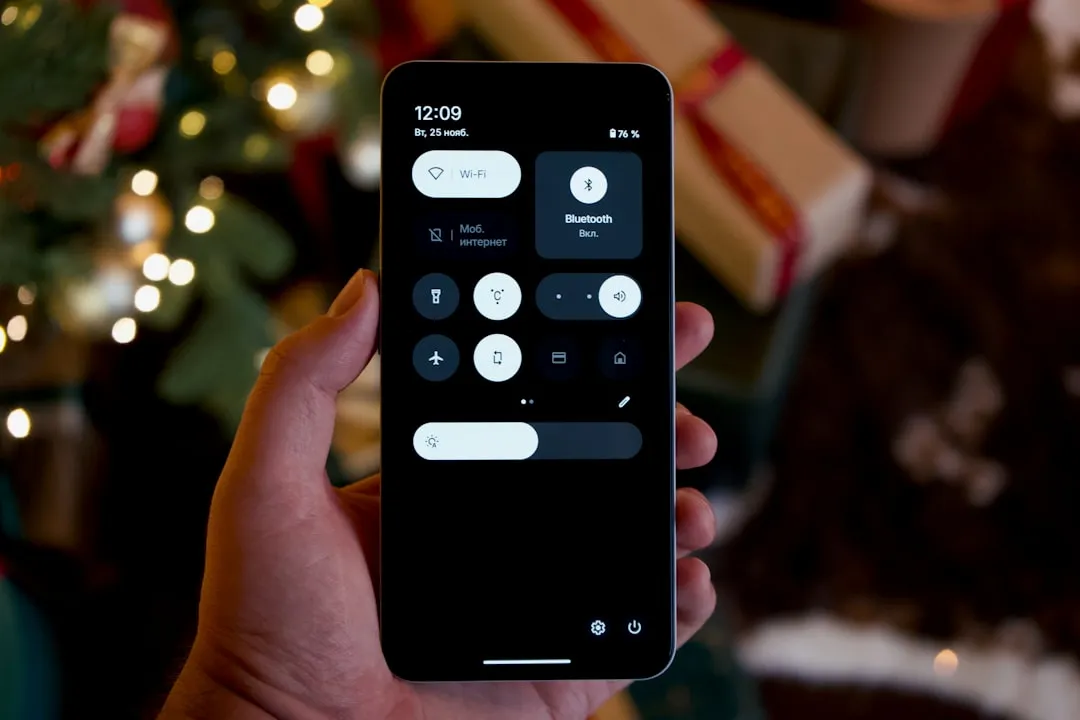
Android 17 Beta 3 Restores Single-Tap Wi-Fi Toggle in Quick Settings
Android 17 Beta 3, released this week for eligible Pixel devices, restores the single-tap Wi-Fi toggle in Quick Settings a behavior Android 12 removed in 2021 and replaced with a pop-up panel that buried the on/off switch users actually wanted. The change has been confirmed by 9to5Google and Android Authority, both reporting earlier this week.
That Android 12 pop-up was not subtle. Tapping the Wi-Fi tile produced a panel listing nearby networks and additional options, with the toggle users actually wanted sitting at the bottom. A one-step shortcut that had existed for nearly a decade became a two-step detour overnight, 9to5Google noted.
The restoration is welcome. What makes it worth closer attention is the context: it follows the identical interaction model Google already applied to Bluetooth in Android 16 QPR1, and it arrives alongside a parallel change that splits Wi-Fi and mobile data into separate Quick Settings tiles. Taken together, these moves point to a deliberate design direction, not a one-off bug fix.
Note: All changes described here are live in Android 17 Beta 3 on eligible Pixel devices. Google has not announced a stable Android 17 release date, per Trusted Reviews.
How the restored Wi-Fi tile actually works and why the 2×1 version is the more revealing design
The mechanics are not simply "tap once, Wi-Fi turns off." The behavior depends on which tile size the user has placed in their Quick Settings shade, and the larger format introduces something genuinely new.
On the compact 1×1 tile, it is exactly what it sounds like: one tap toggles Wi-Fi on or off, no intermediate step, Android Authority confirmed. Clean and direct.
The 2×1 tile is the more useful design. Tapping the Wi-Fi icon on the left side of the tile toggles the connection. Tapping the right side, where the connected network name appears, opens the old network browser pop-up with nearby networks and further options, 9to5Google reported. Long-pressing either tile format opens the full Internet settings page for deeper configuration, per Trusted Reviews.
This detail gets lost when the story is framed as a simple rollback. The 2×1 tile is not the pre-Android 12 design restored wholesale. It is a deliberate hybrid: the fast toggle lives on the left, the network discovery panel that Android 12 made mandatory is still accessible on the right. Speed and discoverability share the same tile without one blocking the other. When Wi-Fi is off, the tile label also scrolls to indicate whether local networks are in range, a status hint carried forward from the Android 12 design, 9to5Google noted.
For beta users: the new behavior is active without any settings change required. Which experience you get depends entirely on the tile size in your shade.
The Android 17 Beta 3 Wi-Fi toggle follows a template Google already used on Bluetooth
The Wi-Fi change is easiest to understand in context. It is the second connectivity tile to receive this exact restructuring, not the first.
The Bluetooth Quick Settings tile was rebuilt on the same model in Android 16 QPR1: a direct on/off toggle as the primary action, with device management one tap further away, both 9to5Google and Android Authority reported. The Wi-Fi tile in Android 17 Beta 3 follows the same structural logic.
That structural logic has a name, even if Google has not given it one publicly. Across both the Bluetooth and Wi-Fi tiles, the pattern is the same: instant actions live at the primary tap target, management surfaces sit one level deeper. The quick toggle does the job users reach for dozens of times a day. The panel for browsing networks or managing paired devices is still there, just not in the way. Google appears to be drawing a hard line between "do the thing" and "configure the thing," and building that separation into the tile layout itself rather than relying on users to know that a long-press exists.
That distinction matters more than it sounds. Before Android 12, the line was implicit: a tap toggled, a long-press configured. Android 12 collapsed that distinction into a single pop-up that tried to serve both purposes at once. The result was a panel that was genuinely useful if you wanted to switch networks, and genuinely annoying if you just wanted to cut your Wi-Fi before getting on a plane. The new design restores the distinction explicitly, splitting it across left and right tap zones on the 2×1 tile.
Android 17 Beta 3 extends this principle further by splitting Wi-Fi and mobile data into separate Quick Settings tiles, ending the unified "Internet" control that Android 12 introduced, 9to5Google reported separately. Each connection now has its own dedicated tile. One behavioral difference is worth noting: re-enabling Wi-Fi is instant, while re-enabling mobile data requires a confirmation tap. That asymmetry is presumably intentional accidentally cutting mobile data mid-call has more immediate consequences than accidentally cutting Wi-Fi.
Google has not published design documentation explaining any of this. The structural consistency across Bluetooth, Wi-Fi, and the connectivity tile split across two separate releases suggests these are not independent fixes responding to separate user complaints. The interaction model is repeating too precisely for that.
What this means before a stable release arrives
The single-tap toggle, the 2×1 hybrid tile, and the Wi-Fi/mobile data split are all confirmed and functional in Android 17 Beta 3 on eligible Pixel devices right now, per 9to5Google and Android Authority.
For users not on the beta, the practical implications are concrete. If these changes reach the stable Android 17 release:
- Toggling Wi-Fi from the notification shade will require one tap rather than two
- Wi-Fi and mobile data will have separate, dedicated controls rather than a single abstracted panel
- Mobile data will require a confirmation tap to re-enable, while Wi-Fi restores instantly
That is a real reduction in everyday friction for anyone who regularly toggles connectivity while commuting, switching between networks, or managing data usage manually. Not dramatic, but the kind of thing you notice every single day.
Two genuine uncertainties remain. No stable Android 17 release date has been announced. Trusted Reviews observed that reversals of widely criticized changes tend to survive to final release, but that remains inference. The stronger signal may simply be that what Google is restoring here was default Android behavior for nearly a decade before Android 12 removed it, as 9to5Google noted. Corrections tend to stick in ways that experiments do not.
The more forward-looking question is whether the left-tap-toggle, right-tap-panel structure extends to other Quick Settings tiles in future betas. Bluetooth got it in Android 16 QPR1. Wi-Fi gets it in Android 17 Beta 3. Two data points is a pattern. Three would be a commitment.











Comments
Be the first, drop a comment!