





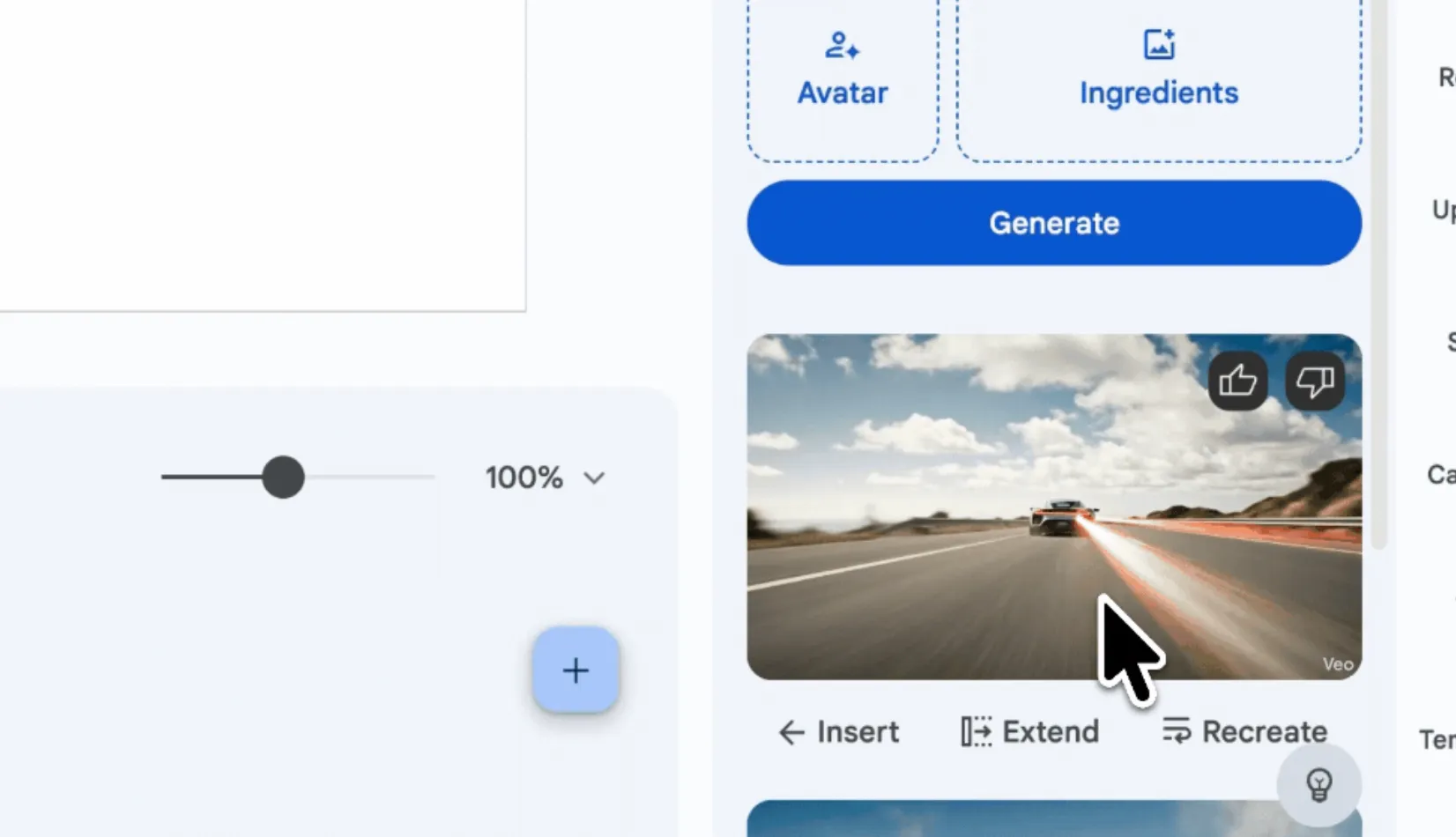
Google started rolling out two Google Vids updates on June 17, 2026: users can now extend existing Veo clips into longer sequences with consistent characters and start multiple video generations at the same time instead of waiting for each one to finish, according to Google Workspace Updates. The features are available across a wide range of eligible Google Workspace, education, consumer, nonprofit, and add-on accounts, though access still depends on Google's plan eligibility rules.
The update builds on Google's April 2026 Vids expansion, which added AI avatars, custom music generation, a Chrome screen recorder, and direct YouTube publishing. Those tools now fit into a more complete AI video workflow: users can now generate short AI clips, extend them into longer sequences, add music, capture a screen recording, and publish directly to YouTube from the same workspace.
How Veo clip extension works in Vids
Clip extension lets users take an existing AI-generated video and continue it forward. In Vids, users select a generated clip in the Veo panel, click Extend, and enter a prompt that describes what should happen next. Google's Vids Help Center lists AI-generated clips at 24 fps and 720p, with landscape 16:9 and portrait 9:16 formats available. The workflow runs through Google Vids on a computer, not a standalone mobile app.
The underlying idea comes from Veo 3.1's scene extension capability. In Flow and the Gemini API, Google says each new clip is generated from the final second of the previous one, which can produce longer sequences that last a minute or more. Google has not published a maximum extension length for Vids specifically.
Google calls the result "perfect storytelling continuity," but that is the company's own product claim, not an independently tested benchmark. Whether audio carries through clip extensions in Vids also remains unconfirmed. Veo 3.1 brought audio to Flow's Extend feature, but Google has not clearly said whether the same behavior applies inside Vids.
How parallel generation speeds up prompt testing
Parallel generation lets users start multiple video requests at once instead of running them one by one. That is useful for prompt testing: users can try different styles, camera directions, actions, or tones and compare the results without waiting for each generation to finish before starting the next.
Google has not said how many generations can run in parallel at once. Monthly generation limits still shape how useful the feature will be. Most users can generate up to 50 videos per month, with the limit resetting at 12 a.m. PT on the first day of each month. Personal Google accounts get 10 free video generations per month, while Google AI Ultra and Workspace AI Ultra accounts can generate up to 1,000 Veo videos per month. Google also says AI Expanded Access users have higher limits, but it does not publish that add-on's exact cap.
For individual users, the catch is simple: parallel generation can burn through a monthly cap faster, especially on personal accounts with only 10 free generations per month.
Which accounts get the new Vids features
The rollout covers a broad set of Google account types:
Business: Business Starter, Standard, and Plus
Enterprise: Enterprise Starter, Standard, and Plus
Education: Education Plus
Consumer: personal Google accounts, including Google AI Pro and Google AI Ultra
Other editions: Enterprise Essentials, Enterprise Essentials Plus, Nonprofits, and Individual
Education add-ons: Teaching and Learning and Google AI Pro for Education
Other add-ons: AI Expanded Access
The rollout is a full deployment for both Rapid Release and Scheduled Release domains, with feature visibility expected within one to three days of the June 17, 2026, start date. Google says there is no admin control for the feature.
What Vids can do after Google's 2026 updates
Google Vids has changed significantly in 2026. In April, Google extended Veo 3.1 access in Vids to all personal Google accounts at no cost, with 10 free generations per month. The same update added Lyria 3-powered custom music generation, AI avatars, a Chrome screen recorder, and direct publishing to YouTube, according to Google's Workspace blog.
Those tools now fit into a more complete AI video workflow. A user can record a screen capture, generate a Veo clip, extend that clip into a short sequence, add an AI-generated soundtrack, and publish the finished video to YouTube from Vids. Google AI Pro and Ultra subscribers can also generate custom music tracks from 30 seconds to three minutes.
Veo 3.1 is also available in Flow, the Gemini API, Vertex AI, and the Gemini app, but Google has not framed Vids as having the same editing controls as Flow.
The Vids limits Google still has not clarified
Several limits are still unclear. Google has not published a confirmed maximum duration for clip extensions inside Vids. It also has not said how many generations can run in parallel at once or whether audio carries through when a Vids clip is extended.
Clip extension and parallel generation make Vids more useful for building short multi-scene AI videos, but the tool still has practical limits: generated clips are 720p, monthly caps apply, and some extension details remain undocumented.











Comments
Be the first, drop a comment!